Invoice Maker by Billdu
Billdu LTDBusiness
4.8571.00 Reviews
- Version
- 26.6.11
- Installs
- 500.00K
- Age Rating
- Teen
Screenshots
Our Review of Invoice Maker by Billdu
 Analysis by Appyee
Before using a dedicated invoicing app, I used to let the paperwork trail behind the actual work: a quote in one message, a client’s details in another, and a reminder to bill them whenever I remembered. That approach can feel manageable until jobs overlap. Invoice Maker by Billdu is designed to bring those small-business tasks into one mobile workflow, and I find it most useful when I treat it as a regular habit rather than a place to rescue paperwork at the end of the month.
From scattered admin to a workable routine
Invoice Maker is a business app from Billdu LTD, available for free to get started on Android and iOS. Its average rating is 4.8 from around 13,000 ratings, and it has been installed over 100,000 times. The app is rated Teen; the current version is 26.2.10, and it requires Android 7.0 or later. Those figures suggest it has found an audience among people who want to handle billing from a phone, but they don’t tell me whether it fits every business. The better test is whether its workflow matches the way you quote, deliver work, and collect payment.
Set up the path from quote to payment
Kicking things off, downloading and setting up the app was a breeze. Available on both Android and iOS, it’s as simple as pie to find it in the app store. Once installed, I was greeted with a clean and intuitive interface that didn’t overwhelm me with options, which is always a good sign.
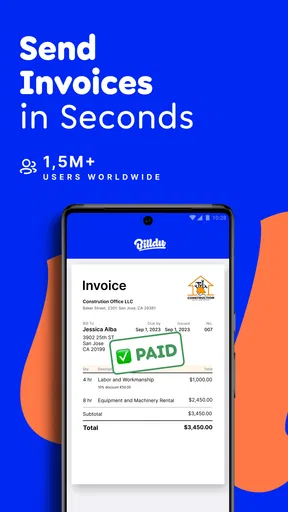
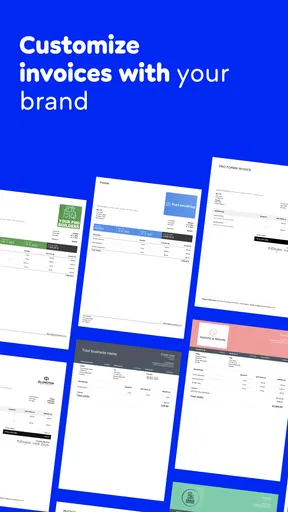
Creating your first invoice is straightforward. You just need to tap on create, fill in the details, and voilà! You can customize your invoices with your logo and color scheme, making them look super professional. I love this feature because, let’s be honest, presentation matters.
A useful way to make that setup pay off is to think through your real quoting process before you start sending documents. Decide what information you routinely need from a customer, how you describe your work, and which details must be correct before an invoice goes out. A polished layout cannot fix an unclear scope or a mistaken client record, so I would check the first few documents carefully rather than assume the template has made every decision for me.
Keep client and expense records close to the work
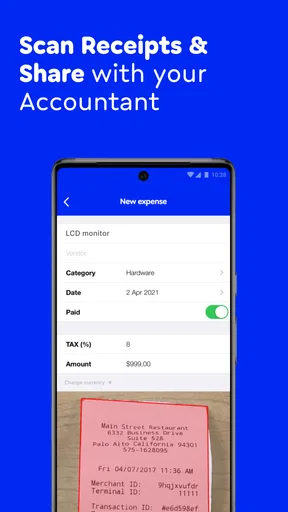
The app isn’t just about creating invoices. It packs a punch with additional features that are incredibly useful. First off, the expense tracking. You can easily record expenses, categorize them, and even attach receipts. This has made my bookkeeping so much easier.
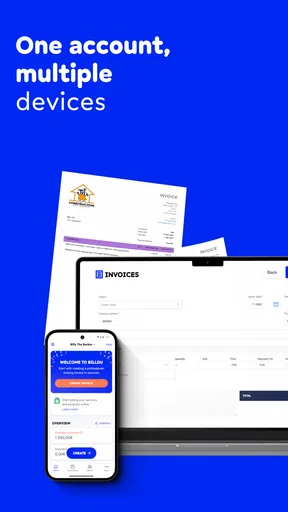
Then there’s the client management system. It stores all your client details in one place, which means no more flipping through emails to find contact information. Plus, it syncs across all your devices, keeping everything up-to-date and accessible.
The practical benefit is not simply having a list of expenses; it is capturing them while the purchase is still easy to identify. If I buy materials for a particular job, I can record the expense and attach its receipt before it disappears into a pocket or a pile of paper. I would still use consistent categories and a short, recognizable note where needed. A record made quickly but labeled vaguely may be hard to interpret later, especially when several jobs involve similar purchases.
Client records can help avoid retyping the same contact information, but they also make accuracy more important. Before reusing a saved client, I would confirm that the selected record is the right person or business and that the document is going to the intended recipient. This small check is especially worthwhile when a freelancer works with several contacts at one company or has clients with similar names.
Make routine work easier to repeat
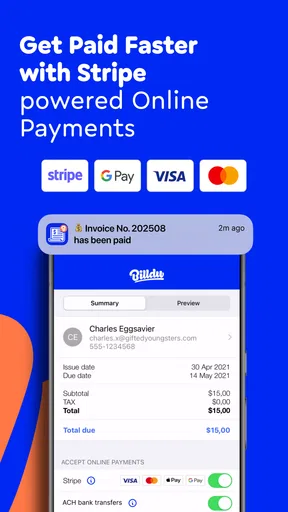
Oh, and did I mention the payment reminders? The app sends out automatic reminders to clients, which is a lifesaver if you’re like me and hate hounding people for payments. It adds a touch of professionalism while ensuring you get paid on time.
Reminders are most helpful when they support a clear follow-up routine, not when they replace one. I would review what is outstanding, check that the invoice is accurate, and then decide whether an automatic nudge suits the client and the situation. For a long-standing customer who prefers a personal note, a direct message may feel more appropriate; for a routine unpaid bill, a reminder can save an awkward task from slipping off the list.
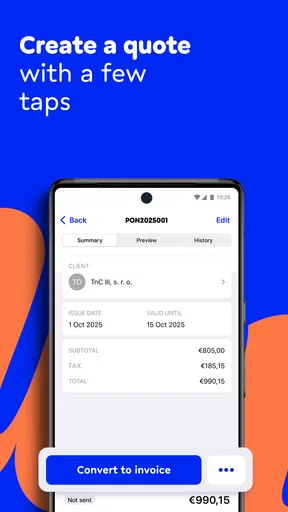
One realistic use is a self-employed tradesperson finishing a small job late in the day. They can record a job-related purchase while the receipt is at hand, use the client record rather than searching old messages, and prepare an invoice before moving on to the next appointment. If the customer first needs an estimate, the same workflow can keep the proposed work connected to the eventual bill. The time saved is less about any single tap and more about avoiding a second round of searching and re-entering details.
Where it differs from spreadsheets and bookkeeping suites
One of the standout features is the ability to convert estimates into invoices with just a tap. It’s seamless and saves so much time. I’ve also noticed that the app supports multiple currencies, which is perfect for those of us dealing with international clients.
Compared with making invoices in a spreadsheet or word processor, a dedicated tool like this gives the process more structure: client details, estimates, bills, expenses, and reminders sit within a business-focused workflow instead of being scattered across files. That can reduce repetitive typing and make it easier to keep track of routine documents. The trade-off is that a spreadsheet is more flexible for someone who wants to build unusual calculations or a highly customized process, and it may be enough for a person who sends only occasional invoices.
Against a broader accounting package, Billdu’s appeal is its mobile, task-oriented feel. It is a more natural fit when the immediate need is to prepare estimates and invoices and keep basic expense records close to daily work. A business that needs extensive accounting controls, formal financial reporting, or a workflow built around specialist compliance should compare it with dedicated accounting software before relying on a lightweight invoicing routine as its whole system. I see it as a practical front end for everyday admin, not a reason to stop checking what records a business must keep.
Multiple currencies may help when working with overseas clients, but they don’t remove the need to agree on the currency and terms before quoting. I would make those details explicit with the customer and verify them on the estimate and invoice. A currency option is useful only when the underlying agreement is clear.
Reports are useful when the records are consistent
The reporting feature is also a gem. With a simple click, you can generate detailed reports that give insights into your business performance. It’s helped me identify trends and make informed decisions about where to focus my efforts.
Reports become more meaningful when entries are recorded consistently. If expenses are added weeks late or categorized differently each time, a summary can look tidy without giving a dependable picture of the business. I would use reports as a prompt for questions—such as which kinds of work seem to bring in more activity or where expenses are accumulating—then check the underlying records before making a major decision.
This is also where the app’s scope matters. A report can help a freelancer review day-to-day patterns, but it should not automatically be treated as a substitute for an accountant’s advice or a complete view of cash flow. Keeping the source documents and reviewing figures at sensible intervals remains part of the job, even when the app makes the overview easier to reach.
Plan around the limits and paid features
While I’m singing praises, it’s worth mentioning that some features are locked behind a subscription. The free version is quite functional, but if you’re looking to unlock the app’s full potential, you might want to consider upgrading.
The app is free to download, with in-app purchases ranging from $7.99 to $239.99 per item. I would not upgrade just because a feature exists: first, I’d use the free experience long enough to identify the actual bottleneck in my work. If I mainly need to create occasional invoices, paying for a broader set of tools may not be worthwhile. If repeated admin tasks are taking time or the available plan includes a feature I genuinely need, comparing the cost with the time saved becomes a more grounded decision.
Another point is the learning curve for some advanced features. While the basics are easy-peasy, diving deeper into the app might take a bit of time to master. Thankfully, the support team is pretty responsive, and there are plenty of tutorials available.
There is also a workflow limitation to keep in mind: moving business administration onto a phone can make quick actions convenient, but it is not always the best place to review a complicated estimate or a long report. For those tasks, I would slow down and check the finished document carefully, especially before sending it to a client. Convenience should make routine work easier, not encourage rushed approval.
Who will get the most from it
I think this app is strongest for freelancers, independent tradespeople, and small operators who handle client work themselves and want estimates, invoices, expense entries, and follow-ups in one mobile-oriented routine. It is particularly useful if you often move between jobs and need to record information while it is fresh. Keeping an expense receipt attached to its entry, for example, can spare you from trying to reconstruct what a purchase was for later.
I would look elsewhere if your work depends on a highly specialized billing structure, complex accounting processes, or deep customization that a simple invoice workflow cannot comfortably handle. It may also be more than you need if you issue only a handful of bills and already have a reliable spreadsheet or document template. In that case, a new app can add another place to maintain records instead of simplifying your day.
Before committing to a routine, I would test the whole cycle with a small, ordinary job: save a client, prepare an estimate, turn it into an invoice if the work proceeds, record a related expense, and review how you would follow up on payment. That reveals more than exploring screens one by one because it shows whether the steps fit your real work and whether you are comfortable with the resulting documents.
My take after weighing the workflow
All in all, Invoice Maker by Billdu is a solid choice for anyone needing to streamline their invoicing and expense management. It’s user-friendly, packed with features, and integrates seamlessly with your workflow. Whether you’re a freelancer or a small business owner, this app can save you time and hassle, allowing you to focus on what you do best.
If you’re tired of the invoicing chaos and want something reliable, give this app a shot. Trust me, it’s worth it!
My recommendation comes with one practical condition: let the app support a repeatable process. Add records promptly, check each document before sending, and make a habit of reviewing unpaid invoices and expenses rather than expecting the software to run the business for you. Used that way, it can take friction out of ordinary billing without pretending that every business has the same needs.
Verdict
Strengths of Invoice Maker by Billdu
- User-friendly interface with intuitive design.
- Offers multiple templates for customization.
- Real-time syncing across devices.
- Supports multiple languages for global use.
- Secure data storage with cloud backup options.
Limitations of Invoice Maker by Billdu
- Limited features on the free version.
- Customization options can be overwhelming.
- Occasional syncing delays.
- Ads can be intrusive in free mode.
- Advanced features require subscription.
Similar Picks in This Category
View All
LinkedIn: Community & Network
LinkedIn3.8

Zoom Workplace
zoom.com4.1

Microsoft Teams
Microsoft Corporation4.6

Meta Business Suite
Meta Platforms, Inc.4.6

Webex Meetings
Cisco Systems, Inc.4.5

TeamViewer Remote Control
TeamViewer4.4
Frequently Asked Questions
What features does Invoice Maker by Billdu offer?
Invoice Maker by Billdu is equipped with a variety of features to streamline your invoicing process. Users can create professional invoices, estimates, and purchase orders. The app supports multiple currencies and tax rates, offers templates, and allows for easy tracking of expenses and payments. Additionally, it provides cloud storage for access across devices.
Is Invoice Maker by Billdu suitable for small businesses?
Yes, Invoice Maker by Billdu is particularly well-suited for small businesses. Its user-friendly interface makes it easy to manage invoices, track expenses, and monitor client payments. With features like automated reminders and integration with accounting software, it helps small business owners maintain a professional image and efficient financial management.
Can I customize the invoices in Invoice Maker by Billdu?
Absolutely! Invoice Maker by Billdu allows users to customize their invoices with various templates and branding options. You can add your logo, choose color schemes, and include personalized messages. This level of customization ensures that your invoices reflect your brand identity and meet your specific business needs.
Does Invoice Maker by Billdu support multiple currencies and languages?
Yes, the app supports multiple currencies and languages, making it an excellent choice for businesses operating internationally. Users can easily switch between currencies and language settings within the app, ensuring accurate financial documentation and communication with clients worldwide.
Is Invoice Maker by Billdu secure for handling sensitive business information?
Security is a top priority for Invoice Maker by Billdu. The app employs encryption and secure servers to protect your data. Additionally, it offers cloud storage solutions that ensure your documents are safe and accessible only to authorized users. Regular updates and security protocols help maintain the integrity of your sensitive business information.
